
(Re)Discovering New Unexplored Waterfalls in Georgia

What is a Rediscovered Waterfall?
Although Georgia contains over 700 waterfalls, the majority of them only entered the public eye during the last decade. On this website, you will find over a dozen waterfalls that used to be completely undocumented until I put boots on the ground and personally rediscovered them. Many other seasoned explorers are constantly crawling across the thickets and hollers of the North Georgia mountains, looking for new waterfalls to find. With that in mind, you might ask: what exactly does it mean to discover a new waterfall?
The probability that you're the first ever person to see a waterfall anywhere in the Southern Appalachian Mountains is practically zero. No matter how remote a Georgia waterfall may feel, it was almost certainly once seen by loggers, for the timber industry had replaced up to 90% of southern Appalachian forests by 1920. The countless old logging roads one stumbles upon while bushwhacking through today's National Forests are relics of this bygone era. More recently, dedicated fishermen and hunters have covered extensive ground in the mountains, seeing natural landmarks the rest of us know nothing about without them ever being shared on the internet.
Don't get me wrong: waterfallers are not the 21st-century Lewis and Clark, discovering uncharted territories amid starvation and hostility. Amazingly, we now have the luxury of access at our fingertips to topographic maps and satellite imagery for every land mass on Earth. Yet it's the individual landmarks like waterfalls that remain largely unmapped to the present day.
When I say that I "discovered" a new waterfall, here's what I mean. I'm talking about a waterfall without any references in print publications or internet searches. This doesn't mean nobody other than me has seen the falls; it just means documentation of the waterfall does not exist. Most often, these undocumented waterfalls await in rugged creek valleys deep in the mountains. The unforgiving terrain and dense vegetation in such places mean that visitors are few and far between, as established trails and roadways often lie hours away. To my surprise, I've also stumbled upon discreet unmapped waterfalls with quick access from nearby roads. A faint path may sometimes even lead to one, perhaps traversed by local word-of-mouth visitors yet conspicuously absent from the interwebs.
So, am I whimsically bushwhacking up randomly selected creeks in hopes of finding undocumented waterfalls? Absolutely not. Modern technology offers a variety of powerful tools that aid us in locating new waterfalls with great precision. I want to share these tools with you below, not only to make your waterfall excursions more informed, but perhaps to even inspire you to go find an undocumented waterfall of your own.
Topographic Maps: GPS Visualizer and Gaia GPS
The basic topographic map has been an essential outdoor exploration tool for generations. Despite being seen as more primitive by some in the face of modern leaps in technology, topographic maps remain quite important in my view. A topographic (topo) map affords a detailed overview of the terrain in any area you might be interested in exploring. At the very least, topo maps typically show names and locations of creeks, mountains, and roads. All drivable forest service roads and many gated roads will be shown on topo maps. Topo maps often also illustrate hiking trails and abandoned logging roads, though the locations of these features tend to be less precise.

For exploring interactive topographic maps online, I have a couple of favorite websites: GPSVisualizer.com and GaiaGPS.com. Upon accessing GPS Visualizer, select the "Draw on a Map" tab and you will find dozens of options for viewing different types of topographic maps for the whole country. For a good level of detail, my preferred choices are "USGS + relief" and "USFS + relief", both of whose data is sourced from CalTopo. The website allows you to draw on maps, mark waypoints, and upload GPS tracks. You can also generate elevation profiles from your tracks. The interface of GPS Visualizer is not particularly mobile friendly, so this website is best utilized via desktop.
Similarly, Gaia GPS allows exploring an interactive topographic map that covers the entire world. The interface is slightly more modern compared to GPS Visualizer, although the choices for different types of maps on the free version of Gaia are fewer. One advantage of Gaia is that it shows many more hiking trails, waterfalls, views, and campsites than GPS Visualizer. Unmarked or user-created trails, as well as old logging roads, are often shown on Gaia. You can also view public land boundaries. However, I have occasionally seen inaccuracies in Gaia data, so keep in mind to not take every little detail necessarily at face value without further research and verification. What sets the Gaia GPS website apart the most is that it's synchronized with a phone app that allows you to record your hikes. The Gaia GPS phone app is also a fantastic resource for exploring topo maps on mobile if you lack access to a computer.

A couple of important topographic map clues exist to suggest the presence of potential waterfalls. Tightly packed contour lines along a waterway indicate particularly steep terrain with possible cliffs, factors facilitating the development of waterfalls. Moreover, a common waterfall signature is a V-shaped notch along a waterway, where the stream appears to enter a steeper and narrower gorge while being squeezed by two knobs or mountaintops on either side. A waterfall can often be found at the head of this notch, where the gorge begins.
Google Earth Satellite Imagery
Until just the last few years, Google Earth software was seen as the premier piece of technology for identifying waterfalls, documented or not. As far as I'm concerned, it remains among the most useful tools in the waterfaller's arsenal. Google Earth is a software that shows 3D satellite imagery of the entire world. This imagery dates all the way back to 1993, though us waterfallers find the greatest utility in more recent sets of imagery. Essentially, any area of bright whitewater that you spot on Google Earth has the possibility of being a waterfall. Keep in mind this is not a slam dunk by any means, because those whitewater areas could often pass for mere powerful, dynamic cascades rather than true waterfalls. However, any standout area of whitewater is worth investigating, particularly if it matches a topographic signature favorable for waterfalls. I find it helpful to use Google Earth's 3D panning feature for evaluating the size of a whitewater zone and the steepness of the surrounding terrain.

Google Earth's leafless satellite views of winter and early spring are particularly conducive to sighting waterfalls. As a rule of thumb, I suggest avoiding summer and fall views if you are looking for waterfalls. During those times, many waterfalls become hidden from satellites' prying eyes beneath our dense Appalachian forest canopy. In addition, the lower flow levels of summer and fall also help make finding waterfalls more difficult. Use the historical imagery slider, indicated with a clock button in Google Earth's upper navbar, to navigate between satellite views from a broad range of different dates.
Let's explore a few different satellite views of Angelica Falls in Rabun County, one of my most prized undocumented waterfall rediscoveries clued exclusively by Google Earth imagery. The waterfall is nicely visible as a distinct stream of whitewater in the most recent view, an early spring view dated 03-2026. This distinct whitewater blob becomes even more prominent in the 03-2019 view, which had the added benefit of being captured during a high-flow period following heavy rain. On the other hand, the whitewater of Angelica Falls is nowhere to be found in the fall view dated 11-2021, as plenty of foliage remains on the trees and water levels are low. I also want to mention the 12-2023 view. Despite being captured in winter, this view fails to show Angelica Falls because it was taken so early in the day that a deep, dark shadow was cast over the falls. In short, I encourage selecting dates with well-lit, leafless, and high-flow satellite views for the best results in finding waterfalls.
A high-flow early spring view of Angelica Falls on Google Earth, dated March 2019.
No two waterfalls look alike on Google Earth. While some resemble powerful torrents of whitewater, a thin sliver of white peeking through the trees may be the best you'll spot at others. For instance, take a look at the below 04-2018 view of Hedden Creek Falls in Rabun County. Despite this being a powerful waterfall of even greater stature than Angelica Falls, even the best satellite views of Hedden Creek Falls will leave you searching for an inconspicuous, shadowy whitewater ribbon surrounded by dense vegetation. Thus, keep in mind even if a Google Earth satellite view does not necessarily show a waterfall with conclusive certainty, sometimes those faint hints of one are your cue that a great waterfall is, in fact, found at the site anyway. This is especially true of waterfalls in small watersheds. I've put boots on the ground at prospective waterfall sites before thinking that the chances of finding one were merely 50-50, based on inconclusive satellite evidence, yet I often came away with an outstanding waterfall discovery anyway.

I enjoy looking for undocumented waterfalls on Google Earths by panning creeks on lookout for unfamiliar areas of whitewater in places where I am unaware of established waterfalls. I might first identify a prospective site on a topographic map, place a waypoint in GaiaGPS, record the lat-long coordinates, and paste them into Google Earth to further inspect the site.
I also want to mention Google Earth's utility in planning cross-country hikes. I can see forest roads on satellite imagery, helping me to determine a good spot to park and head off into the woods. If I plan to go bushwhacking, I will first scan the vegetation on satellite views and try to find areas that look like more open woods. I even look for rock formations, cliffs, and potential mountain views on satellite imagery. Google Earth is all around an incredibly valuable and indispensable tool for waterfall hunters, beyond even the standalone goal of spotting the waterfall itself.
As of October 2026, I primarily use Google's "Earth Pro" desktop software in my waterfall research. It is far superior to the satellite views found in the aerial imagery setting on Google Maps, which carries lower resolution and does not allow selection of prior dates. I have found numerous waterfalls on Google Earth Pro's views that I would've never noticed if I only used the more simplistic aerial views from Google Maps. Google Earth also has a companion mobile app, available for iPhone and Android, where users can track their location on satellite imagery in real time if cell service is available. More recently, Google launched "Earth on Web." This new online version is expected to replace the traditional desktop software in June 2027. While my use of Google Earth Web has been limited so far, I expect I'll be transitioning to it in the near future.
U.S. Geological Survey LiDAR Data Viewer
LiDAR. Light Detection and Ranging. The elephant in the room. This newcomer in the waterfaller's toolbox has quickly become the granddaddy of waterfall hunting technology. Succinctly put, if LiDAR data is available in a given region, you will have the ability to locate any and every waterfall in existence. Almost sounds too good to be true, eh?
LiDAR data is collected from aircraft-mounted laser lights that point down toward the surface of the earth, capturing every little detail of its topography. This new dataset is essentially a topographic map on steroids, allowing users to identify elevation differences as minuscule as two feet. As of 2026, the entire state of Georgia now has public LiDAR coverage with high resolution. I use LiDAR to map an endless aray of landforms and features: waterfalls, cliffs, floodplains, sinkholes, old logging roads, you name it. LiDAR data comes in many different forms with numerous applications. For waterfall exploration purposes, two forms of LiDAR are most useful: hillshade and 1-meter contours.
The public has direct, effortless access to LiDAR data on the interactive USGS 3DEP Elevation Viewer website. In the following section, I will explain how to use this data to bring your waterfall hunting pursuits to new heights. Use the USGS website to follow along.

Upon accessing the USGS website, the first view you will see is an interactive topographic map, allowing you to easily zoom into a close-up area of your choosing. Once you have found a site you wish to investigate via LiDAR, go to the layer list dropdown on the right side of the screen and look under "3DEP DEM Layers." Here lie several options for viewing terrain hillshade. I prefer the multi-directional hillshade over the regular hillshade view. Regular hillshade illustrates terrain from one specific angle, so certain areas like north-facing slopes will have less detail than others. On the other hand, multi-directional hillshade combines data collected from several different angles, making landforms less likely to be missed.
Whenever you're examining the course of a creek on LiDAR hillshade, a waterfall will always show up as a distinct dark area. A dark 'line' on this hillshade view suggests a cliff or rock formation. The point where cliffs meet streams is where waterfalls occur. Areas of increased darkness at creeks generally indicate steeper and larger waterfalls (more vertical cliffs), though the shades of gray and black can also fluctuate based on slope direction. The coordinate viewer on the interactive map's bottom left allows you to select a point of interest on the map and save its coordinates.
In addition, hillshade views allow users to spot the paths of many abandoned old logging roads. Carved out of the hillside decades ago, these roads usually present themselves as noticeable indentations in the landscape. This makes hillshade extraordinarily useful in finding potential routes to follow along off-trail hikes. I also take note of the locations of potential sheer cliffs seen on hillshade views, marking them in my GPS as areas to bypass when plotting my cross-country route to a waterfall.
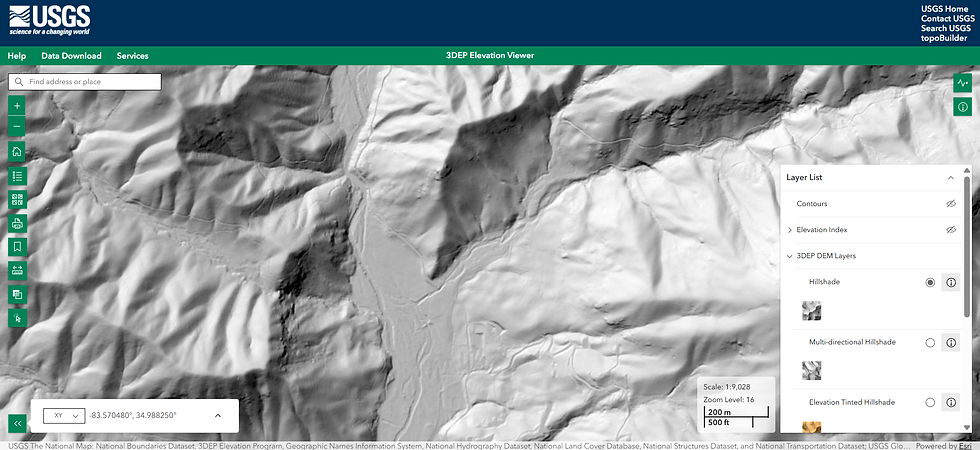

When looking for hillshade waterfalls, here are a few things to keep in mind. The different shades of gray can be deceiving. As mentioned earlier, hillshade does show absolutely every waterfall in existence. However, it can also suggest potential waterfalls that don't actually exist. For instance, it might appear to be a vertical cliff, but a boots-on-the-ground survey will show the site to merely be a steep cascade overgrown with dense rhododendron. Additionally, old logging roads prominently visible on hillshade could turn out to be overgrown, even to the extent of being impassable. These LiDAR views do not account for vegetation density. Such is the unpredictable nature of off-trail exploration. While tools like LiDAR make planning easier, surprises are inevitable.
I also want to cover the utility of 1-meter contours in finding waterfalls. LiDAR data is unique, because its ultra-detailed terrain data essentially creates a topographic map on steroids. Topo maps are typically contoured at 40-foot or 20-foot intervals. On the other hand, online LiDAR maps have contours at an amazing 3-foot (1-meter) interval. These contour intervals can be used to estimate the height and steepness of any waterfall. When selecting contours under the layer list dropdown, a new "Contour Properties" dropdown will pop up, allowing to narrow the contour interval down to 1 meter.
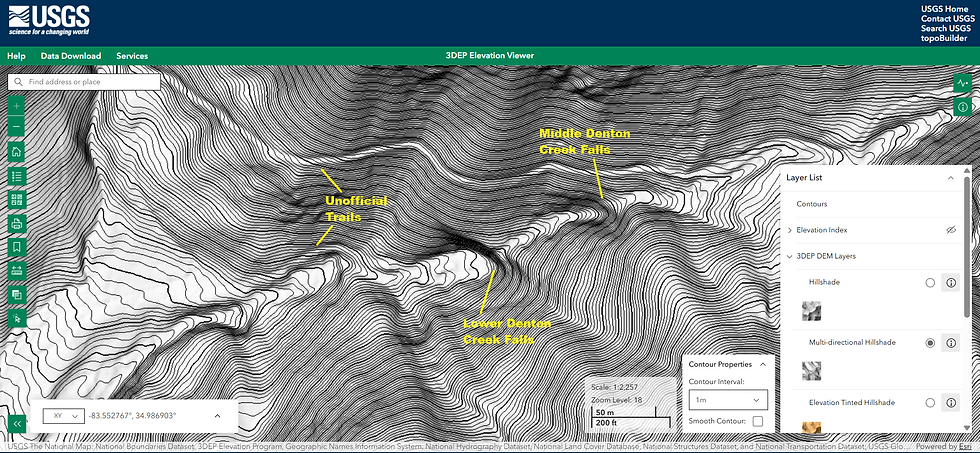
Suppose you were exploring hillshade and think you may have found a new waterfall. You can use the number and proximity of 1-meter contours to help determine whether this is actually a vertical waterfall or just a steep cascade. Of course, neither hillshade nor 1-meter contours will tell you how overgrown a waterfall is, so Google Earth tends to be more useful in this regard. However, the significant advantage of LiDAR is its ability to show every single waterfall, in contrast to Google Earth's satellite imagery often failing to show waterfalls in more forested areas and on smaller canopied streams.
Let me add one final note about LiDAR data. For Georgia, the USGS 3DEP explorer website is the best public source of LiDAR data that I am aware of. A variety of other maps have begun to incorporate hillshade terrain data from USGS, including now my own interactive Georgia waterfall map. However, this data is available at a higher level of detail at the USGS website, which is the original source. Additionally, states like Tennessee and South Carolina have made even more detailed LiDAR data files available for download. Unlocking hillshade and contour data from these enormous files would require high-speed internet, ample hard drive space, and a significant time commitment to learn mapping software like QGIS or ArcGIS Pro. While I have ample software knowledge to explore LiDAR in GIS programs, I generally prefer the USGS website for waterfall hunting purposes due to its ease of access and user-friendly interface. Either way, I am not currently aware of a separate state-managed downloadable source for LiDAR data files in Georgia, but that may change in the future.
Looking to the Future
As new technological innovations continue to be achieved in the world of waterfall exploration, these tools are becoming increasingly controversial in the outdoors community. More and more people are discovering LiDAR every day as a brilliant new invention for exploring the mountains and finding waterfalls, yet others have taken the stance that LiDAR is a "cheat." The latter group often speaks of preferring the enthusiastic, uncertain chase from older-school tools like Google Earth or even just plain topographic maps. Personally, I will happily take advantage of any tool making my waterfall explorations/visits easier, safer, and more enjoyable. Since LiDAR is not common knowledge yet, I do not wish to hoard this knowledge and am sharing the information above in hopes it will transform the waterfallin' experience for others like it did for me.
Today, the waterfalls of Georgia are mapped in greater detail than ever before, but I'm confident that plenty more undocumented waterfalls remain hidden out there, especially on small streams. Given the unfathomable rate at which AI technology is progressing, I expect natural landmarks like waterfalls to become increasingly better mapped in the coming years. But in the meantime, if you've got an adventurer's knack, consider grabbing a map and compass and exploring a mountain stream near you. You never know what you'll find. Even when the quest for waterfalls comes up short, I always leave feeling rewarded for visiting a place where few others have set foot.
Comments